This is the home for Digital Mobile Radio (DMR) information in Oklahoma. DMR radios use repeaters from Motorola Solutions’ branded MOTOTRBO (a.k.a. TRBO) DMR Radio. MOTOTRBO adds additional features to a standard DMR radio, including something called IP Site Connect. This lets users network these repeaters worldwide. When one person transmits, multiple repeaters can be keyed up on the network (like a D-Star reflector) without the user having to fumble through finding node numbers or access codes. The Oklahoma repeaters switched from the DMR-MARC network to the Brandmeister network on November 16-18, 2016.
Each repeater is a UHF or VHF full-duplex transmitter/receiver pair that connects to a duplexer and then to an antenna in a vertically advantageous location. Typically, these are on towers, mountaintops, or tall buildings. Here in Oklahoma, the mountaintop option doesn’t come into play much. The Oklahoma Repeater Society, Inc. (ORSI) coordinates each repeater’s frequency pair. The repeater owner enters his or her callsign into the repeater to provide the required CW identification. A color code identifies the repeater. The magic happens when you enter a Master Server IP address into the server, and the repeater connects via the Internet to a Master Server.
Each handheld or mobile radio needs to be programmed to work. Like any other modern ham radio, you use a computer to set the controls. You need to program the frequencies for each repeater. The next piece of information is a ‘color code,’ which is a number from 0 to 15. Think of that as a CTCSS tone. The two final pieces are the time slice and talk group. Each variable is described below. In the radio business, we call this collection of information a ‘code plug.’ In plain terms, this information is called a configuration file. We’ve collected codeplugs and the links to the software to download these configurations to your radio on our codeplugs page.
Oklahoma Repeater Summary
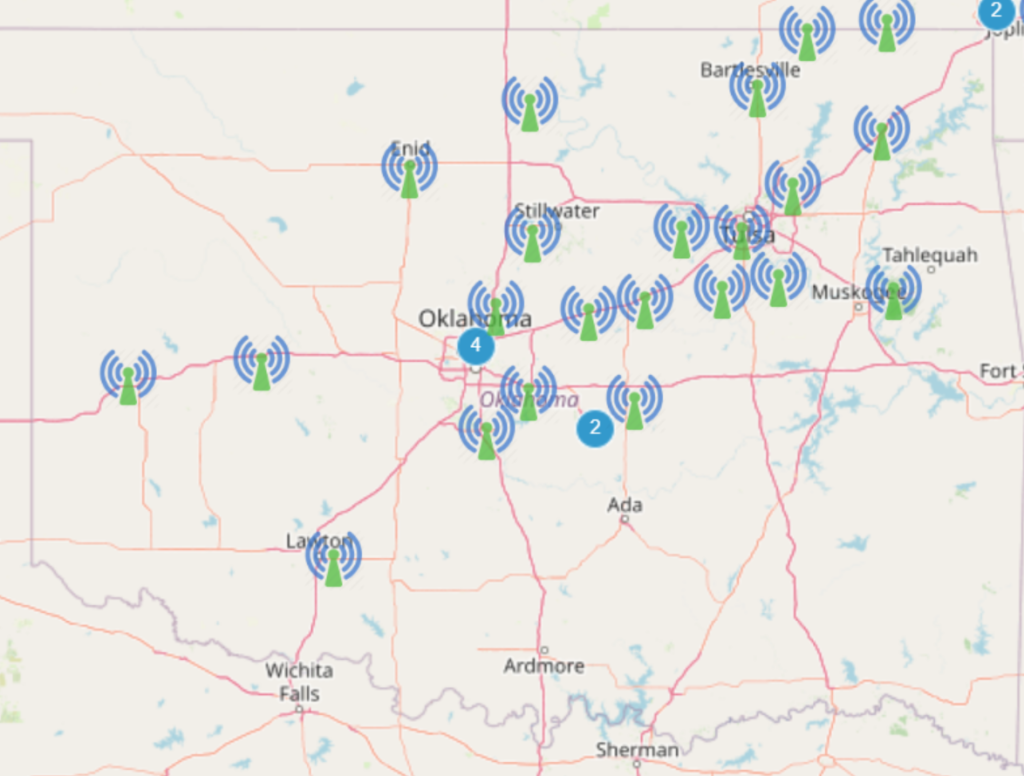
Currently, 30+ DMR repeaters in Oklahoma use the Brandmeister Network.
DMR ID	City	       Frequency	Color	Offset	Trustee
310130  Lawton          147.3300        4     +600 kHz  WX5LAW
310153  Durant          444.1250        1       +5 MHz  AB5CC
314648  Davis           442.7500        1       +5 MHz  W5OU
312748  Elk City        147.2250        1     +600 kHz  N5CH
313046  Seminole        442.7500        1       +5 MHz  KW5CCC
311500  Tecumseh        443.3750        1       +5 MHz  K5THS
314000	Calumet		444.3250	1	+5 MHz	AE5DN
314002	Tulsa South	442.1625	2	+5 MHz	WD5ETD
314003	NW OKC		442.6250	1	+5 MHz	AE5DN
314004	Fort Gibson	442.1250	1	+5 MHz	WA5VMS
314005	Tulsa Central	442.4750	2	+5 MHz	W5RAB
314006	Keetonville	442.3500	1	+5 MHz	W5RAB
314007	Stillwater	444.4750	1	+5 MHz	AE5DN
314008	Mannford	444.4500	1	+5 Mhz	W5RAB
314009	Granite		442.0750	1	+5 Mhz	K5XTL
314010	Mounds		444.8500	1	+5 MHz	W5RAB
314011	Ponca City	444.7500	1	+5 Mhz	K5BOX
314012	OKC Downtown	443.2250	1	+5 MHz	W5GDL
314013	Bartlesville	444.4750	2	+5 MHz	W5RAB
314014	Big Cabin	443.8250	1	+5 MHz	W5RAB
314015	Depew		444.3750	1	+5 MHz	W5RAB
314016	Norman		443.8250	1	+5 MHz	N5MS
314018	OKC East	443.1750	1	+5 MHz	KB5KWV
314019	SE Edmond	443.0500	1	+5 MHz	W5RLW
314020	Edmond		442.3250	1	+5 MHz	W5RLW
314021	Leonard		443.6500	1	+5 MHz	W5RAB
314024  North OKC       442.5000        1       +5 MHz  N5KNU
314477  Chandler        444.6750        5       +5 MHz  KX5MOT
Timeslices
The DMR system splits the radio signal into two distinct channels, called timeslices. These are named Timeslice 1 and Timeslice 2. This lets two different audio channels be sent and received simultaneously from the same repeater. To program the radio correctly, you need to know which talk group is on which timeslice for your desired repeater. In Oklahoma, we’ve agreed that Timeslice 1 should be for international, national, or regional traffic. We use Timeslice 2 for statewide (3140, 31401, 31402, 31408) and more local talk groups. If you don’t know which Timeslice to use, select Timeslice 1. Technically, this is done by splitting the signal into 30-millisecond-long pulses. Data compression allows the data to be sent quicker than 1/2 the ‘real-time’ of the audio information.
Talk Groups
Talk groups (TG) are used to separate repeater traffic by the ‘size’ of the area you will use. The Oklahoma repeater administrators have set up the static talkgroups on their repeaters in the same way. One of the Brandmeister system’s strengths is that the user can select which talkgroups they want to hear. As such, the static groups are just the ones that transmit all day. You can use any other dynamic talkgroup as long as you kerchunk (key the microphone) that talkgroup once every 15 minutes. This is the static shortlist used on the Oklahoma repeaters:
Time Slot #1 - Group Call 31095 = US Call Sign Region 5
Time Slot #1 - Group Call 31400 = Oklahoma TAC (for ARES type events)
Time Slot #1 - Group Call 31408 = Oklahoma Weather

Time Slot #2 - Group Call 3140 = OK Statewide
Time Slot #2 - Group Call 31401 = OK Central (For Depew and West)
Time Slot #2 - Group Call 31402 = OK East (For Depew and East)
Time Slot #2 - Group Call 3140xx = Local repeater group
More Brandmeister talkgroups are listed on the Brandmeister wiki.
A selected few Brandmeister talkgroups are detailed as follows:
- Local TG 2 – Stays on the same repeater and isn’t routed to any other repeater. This talkgroup stays local to each repeater, so it is not available to hear on the Brandmeister Hose.
- Norman OK TG 314016 – This talkgroup should be used by all who want to connect back to Norman area hams from remote locations. Think of this as a ‘SCARS/Norman Talkgroup.’ The codeplugs supplied from this site will have this talkgroup in the receive list, so the locals can hear our people connecting from remote ‘dongle’ based systems or are connecting from the rest of the globe who want to talk back to us. This is set up as a static group on the Norman Repeater in Time Slice 2.
- Oklahoma TAC TG 31400 – Use this talkgroup for special event activities. Examples include the OKC Memorial Marathon or other ARES events. This talkgroup should be used on Time Slice 1, and during actual events, the repeater owners will make this static on the repeaters in the affected areas.
- Central Oklahoma TG 31401 – This talkgroup links the Depew repeater and everything west of there into this channel. This static talkgroup is in Time Slice 2, in the Central Oklahoma Standard assignments.
- Eastern Oklahoma TG 31402 – This talkgroup links the Depew repeater and everything east of it into this channel. This talkgroup is a static talkgroup in Time Slice 2, in the Eastern Oklahoma Standard assignments.
- Oklahoma Weather TG 31408 – This talkgroup is used to talk about Oklahoma weather. Each Saturday morning at 8:00 am local time the group meets to talk about the weather for the week. This talk group is where you should listen when severe weather infiltrates the state. Some repeater operators have set this to static in Time Slice 1. Others should also use Time Slice 1 to dynamically link to this talkgroup.
- OK Statewide TG 3140 – This talkgroup links all of the Oklahoma repeaters into one group. This talkgroup is used for the Monday ARES net. This talkgroup is a static talkgroup in Time Slice 2, in the Oklahoma Standard assignments.
- Call Region 5 TG 31095 – This talkgroup links all states in Region 5 into one talkgroup. This talkgroup is a static talkgroup in Time Slice 1, in the Oklahoma Standard assignments.
- North America TG 3100 – This talkgroup connects all 300+ repeaters in North America into one group.
- Worldwide TG 91 – You will hear people and languages from across the planet on this talkgroup.
- Worldwide Young Ladies (WWYL) TG 955 – This talkgroup is a dynamic channel (meaning you have to kerchunk the radio to hear traffic on this channel) and is used for YL’s to connect with other YL’s from around the globe.
- TAC TG 310 – This ‘Tactical Action Channel’ talkgroup is a dynamic channel (meaning you have to kerchunk the radio to hear traffic on this channel). Use this talkgroup for conversations after connecting on the North America channel.
- TAC TG 311 – This ‘Tactical Action Channel’ talkgroup is a dynamic channel (meaning you have to kerchunk the radio to hear traffic on this channel). Use this talkgroup for conversations after making a connection on the North America channel. Click here to listen to this talkgroup online, on the Brandmeister Hose, in real-time.
- TAC TG 312 – This ‘Tactical Action Channel’ talkgroup is a dynamic channel (meaning you have to kerchunk the radio to hear traffic on this channel). Use this talkgroup for conversations after making a connection on the North America channel.
- TAC TG 313 – This ‘Tactical Action Channel’ talkgroup is a dynamic channel (meaning you have to kerchunk the radio to hear traffic on this channel) and is used for conversations after making a connection on the North America channel.
- Parrot Private Call TG 9990 – This talkgroup records what you transmit, then plays it back to you after you unkey your transmitter.
Receive Lists
A receive list defines which talkgroups you will listen to on the same time slice. If you are programming a channel for Central OK, you must add a receive list that includes the Central OK talkgroup. You can add other talkgroups to this list, and if they are transmitting on this channel’s timeslice, you will be able to hear them as well. Typically, it’s good practice to have a channel available that has a receive list for only the channel you’re talking on, so you hear the other party, and another that has a receive list with all of the talkgroups available, so you can listen to what is on the other talkgroups.
Weekly Oklahoma ARES Monday Night Net
Every Monday night there’s an ARES net on the statewide DMR (3140), talk group, at 8:15 pm Central Time. The purpose of this net is to communicate statewide ARES information and to test the use of the statewide talk group for emergency purposes. Typically, you’ll hear check-ins from across the state, and now, with Brandmeister, across the globe, on this net. Take a listen, and check in to join the fun.
More DMR Nets
We’ve collected a bunch more DMR nets and have listed them on the W5NOR meetings page.
Brandmeister User Guide
Here’s a great User Guide for the systems connected to the Brandmeister DMR networking system.
Online Repeater Map
Brandmeister maintains an online repeater map to help you locate repeaters inside and outside of Oklahoma.
Brandmeister
The Brandmeister Network website is the best source of DMR information. The Brandmeister Wiki website is a great place to start looking for Brandmeister DMR information.
Getting Started – Codeplugs
The best way to get started with DMR is to use a configuration from someone in your area. Don’t forget to add your callsign and DMR number to the codeplug before you download it to your computer. Once it’s running, look at the codeplug and see what you need to modify for your use. We’ve collected codeplugs and the links to the software to download these configurations to your radio on our codeplugs page.
Color Codes
Each repeater is assigned a “color code” that works like a CTCSS tone in the analog world. A user must program their radio with the repeater frequency, the offset (typically similar to the analog equivalents), and the repeater’s color code. This color code lets two repeaters share a frequency over long distances without interfering with each other on “good propagation” days. These codes have no significance. They need to match between the repeater and the client radio.
DMR ID Numbers
Each repeater and amateur radio operator needs to obtain a DMR ID number. Each operator only needs one number. Program this number into each radio. This number is a 32-bit number, represented as a seven-digit decimal number. The DMR ID ties your callsign to the radio transmissions so the real-time displays, both on the radios and on the web, will know who’s transmitting. The use of this number does not constitute an official legal ID.
DMR Real-time monitoring
One benefit of connecting all these radios is that administrators can create real-time displays. This real-time display will show every transmission, from every radio, from across the world. Take a look, and you’ll see who’s talking and on what repeater. This helps you see whether your signal is getting out or whether your transmission is experiencing packet loss between you and your nearest repeater.
APRS GPS information
Some ham DMR radios can transmit their GPS locations via the Amateur Radio Packet System (APRS) network. Information from a properly set up radio will appear on the APRS.FI web system. The people who run the PAPA network have a great document titled Brandmeister Getting Started Guide, and on page 8, they include a great GPS setup guide. Motorola radios have been shown to make this work. Hytera systems may have some trouble, and the TYT MD 390s still aren’t making connections. Brandmeister has set up Talk Group 310999 as the site for you to point your GPS information toward…
DMR Etiquette
Operation on the DMR protocol is very similar to what you’ve become used to on a VHF/UHF FM repeater, with a few minor differences.
- Use the repeater that gives you the best signal. Usually, that’s the one that’s closest to you, but you should experiment with those near you to make sure you sound good to others. Remember to use the Parrot channel on each repeater to see what your audio sounds like.
- Check your audio level. Since the audio is digitized on your radio and no leveling happens in transit, it’s important to send a proper audio level. Use the Parrot, or ask your friends to verify your audio level, and remember the mic-to-mouth distance for your radio.
- Use the smallest area talkgroup to keep communication working. If you and the person you’re talking to are using the same repeater, use the Local talkgroup. If you’re both in the Central OK area, then use that talkgroup. Both in OK, use the Oklahoma Statewide channel. OK/TX area, use Regional, etc.
- The USA talkgroup is ONLY for use as a calling frequency. Make your call on this channel, then switch to a TAC talkgroup, like 310, 311, or 312. Make sure these talkgroups are clear before you start your conversation on one of the TACs. Asking “Is this talkgroup in use?” is a good way to start that message. If so, try the next TAC Channel.
- When you wish to talk with anyone on a given talkgroup, it is common to give your callsign, your location, and the talkgroup. For example, “This is N5HZR, in Norman on Central Oklahoma”.
- Remember that each repeater has two timeslots (1 & 2). You may see your radio indicating a receive light, and hear nothing. This traffic may be the CWID, or a signal on the other timeslot, or a talk group that you’re not listening to.
- When you press the Push-To-Talk (PTT) button, wait to hear the confirmation tones before you start talking. When you press the button, your radio contacts the repeater, makes sure it’s not busy, and confirms you can reach it. A long tone, or no tone when you hit the PTT, means your transmission did not go through.
- If you’re in a conversation with another person and, for some reason, you lose contact, either end may have traffic blocking your conversation. Watching your receive light will let you know if the blocking is happening at your end. Wait for a clear condition, then try again.
- Each channel has a receive list that lets you listen to additional talkgroups on the same timeslice at the same time. So, if you’re listening to a Local talkgroup, you must add a receive list that will let you listen to Central OK and Statewide at the same time. This may let you hear what’s happening on this timeslice. This may also confuse you. To keep this straight, you can read the front of the radio to be sure you know what you’re listening to. If this causes you grief, remove the receive list from the offending channels. Typically, it’s good practice to have a channel available with a receive list that includes only the channel you are listening to, so you only hear the other party, and a channel with a fully populated receive list, so you can hear what’s on the other talkgroups.
- To keep your radio organized, set up several zones. One way to set up zones is to assign a different zone to each repeater. That way you can cycle through all of the talkgroups on a given repeater by twisting the knob. Another zone setup can be set up by talkgroup. That way you can cycle through repeaters as you drive through an area. For example, if your OK State zone is set up, you can start in Norman, then twist the knob to OKC Downtown as you go north on I-35, then rotate to Edmond, Stillwater, and Ponca City as you head north. Other methods are also possible.
- Scanning is allowed among the channels in a given zone. Remember, you can set up analog channels, which lets you switch between UHF analog channels and various DMR repeaters and time slices. The downside is that this process requires an additional battery. You’ll definitely see the battery drain quicker.
- Codeplugs are personal. Your very first codeplug has enough to get you going. You’ll find you work differently from the next person, and you’ll start making changes that match how you use the radio. Make sure you keep a copy of your codeplug on your computer, so you can reload this into a new radio as one appears.
Reflectors on DMR
The concept of reflectors was created specifically for DV4Mini hotspots, since they didn’t have the ability to use proper talkgroups. D-STAR users are already accustomed to this idea and method of operation. Reflectors provide a dynamic way to attach a specific talkgroup to the local talkgroup 9. Reflectors are not required in DMR. You can make every reflector connection by selecting the proper talkgroup. On the DV4Mini hotspot, typically the radio is programmed to use talkgroup 4999, and then the user logs into the Brandmeister dashboard, clicks on their hotspot, and can change the talkgroup directly from that webpage.
For example, talkgroup 3100 is connected to reflector 4639. If you key up your radio on talkgroup 4639 and then move to another channel in your radio programmed to receive and transmit on talkgroup 9, you can participate in conversations on talkgroup 3100.
If you transmit on talkgroup 4000, it will disconnect the current reflector from talkgroup 9. If you transmit on talkgroup 5000, it will read back the number of the reflector that is connected to talkgroup 9. In the example above, you would hear four six three nine.
The repeater owner settings page, which each DV4mini operator can access, lets them connect to a reflector without using the radio. A second web-page setting lets you configure a default reflector your repeater returns to after a given timeout period.
Repeater Coverage Maps
Coverage maps for each repeater are available on the Brandmeister repeater pages. First, select your favorite repeater by searching for its callsign or location. Then click the name to open that repeater’s page. Scroll down to the map, and click on the little blue diamond in the top right corner of the map. A pop-up menu will appear as you get near. If you select the ‘Plot’ option by clicking the checkbox, a coverage map for that repeater will appear on the screen.
Currently, Oklahoma repeaters have about 40-mile coverage circles, except for the North OKC repeater, and the service areas overlap significantly. Coverage is pretty seamless on the I-35 and I-44 corridors, with some gaps from Ardmore to Pauls Valley. The north OKC repeater is up at the 755′ level and provides about 100 miles of coverage with a mobile radio.
More Information
More information may be available on the OK DMR Yahoo Group.
DMR, D-STAR, System Fusion Comparison
PowerPoint presentation slides by Mark Kleine N5HZR to the SCARS meeting on April 9, 2016.